Showing posts with label software utilities. Show all posts

Friday, December 2, 2011

Saved from a Malicious Stalker!

Once again my life was saved by Microsoft's free antivirus.  I was busy browsing the web from Stumbleupon and I probably clicked on a link on some of the sites I've been browsing. Suddenly a window appeared - it is a Microsoft Security Essentials window. It was warning me of a possible threat found on that website and is trying to access my machine.

I remember having this same issue in another machine of mine that is quite old and is still using the Windows XP on it. Once infected with the virus, whenever I go to Facebook, I go to a different site with the same url as the facebook's. Can you believe that? 

It's not a joke when you face this same scenario so if ever you have been infected with a virus here is what you should do.

Thursday, November 17, 2011

Dropbox is Great!

I have been using Dropbox for quite sometime and I can now say confidently that it is indeed very useful. I've shared photos with friends and family and shared files as well. One great thing about it is that it is VERY EASY to use. Here are it's features:

  • 2GB of Dropbox for free, with subscriptions up to 100GB available.
  • Your files are always available from the secure Dropbox website.
  • Dropbox works with Windows, Mac, Linux, iPad, iPhone, Android and BlackBerry.
  • Works even when offline. You always have your files, whether or not you have a connection.
  • Dropbox transfers just the parts of a file that change (not the whole thing).
  • Manually set bandwidth limits -- Dropbox won't hog your connection.
You can register now and enjoy their services. You can also use it to store private files that are important to you on a secured private folder that is only available to you.

By the way here is a sample gallery of my family pictures, check it out HERE!
 
JOIN NOW!

Monday, November 7, 2011

Foxit Acrobat Reader a Great Alternative

Are you tired of using the usual Adobe Acrobat Reader? or just don't like how their installer keeps tracking Adobe products. Well here is a great alternative and pretty much lighter too. It is a from Foxit Software company. They also have some other products and software that is quite useful for developers too. I'll probably take a look at their products if every I need one for products that we develop.

It is also for FREE so no worries about the cost. They also have readers for different kinds of handsets of different kinds of operating system like Windows Mobile, Android and for Symbian OS (mostly Nokia cellphones.)


I have tried it and it actually loaded my PDF file quite easily than Adobe's own reader. Go to their site and download a copy now. http://www.foxitsoftware.com/downloads/

Tuesday, November 24, 2009

Twittering on Your Desktop

Are you following on a twit or always in a hurry to twit? You don't need to go to your favorites URL, you can always show it on your desktop. Just login and post your new twit or read your friends' twits. You can even add short URL's to your post.

Twitteroo is the answer to that. Download version 1.5. Don't worry, I am going to post an update post once there is an update. I am also using this tool, it is very helpful.

OR go to there homepage below.

Here are the Twitteroo Features:

Twitteroo 1.5 is now available for download! But wait, that’s not all — the TwitterooCore API 1.4 is also available. The Twitter.com API changed slightly so we have updated the TwitterooCore to reflect those changes.

New Features

  • Double-click on any user’s status message and Twitteroo will automatically address a reply to that status
  • Usernames are shown in the status list to match Twitter.com (the full name is shown when a user’s status message is selected)
  • User icons are now cached so that you can Tweet even faster than before
  • Pressing the Enter key (or Ctrl+Enter) will send your status update to Twitter.com

Bug Fixes

  • The status box will not let you add line breaks (returns) into your status message
By the way, it is FREE!

Sunday, November 22, 2009

Tidy-up Your Bookmarks!


OrdinarySoft has just made a really great way of tidying-up all your bookmarks.

Tidy Favorites was developed to simplify the generation and management of PC browser bookmarks. Its intuitive Graphic User Interface (GUI) has been designed to minimize the management task and maximize the PC users experience with Internet navigation to web sites that are often visited. Tidy Favorites is simply a browser bookmark management tool that is so easy to use bookmarks may be added or deleted with such ease the user can spend more time enjoying the educational and entertainment values of the Internet versus spending time managing the bookmarks themselves. Whether the bookmark quantity is small or extremely large the degree of "bookmark management" only varies slightly.
Check out the video and be amazed. They have a Free version and also have the PRO version. A must try program for all surfers who like to bookmark websites according to their different interests.

Cllick HERE to go to the website.

Sunday, November 15, 2009

Freebie of the Day: ZScreen

Have you seen the images I posted in my tutorials? Well, it wasn't made by just tapping the Print Screen. When I was using Adobe Photoshop, print screen button wasn't working at all. I'm suspecting that my current memory is fully utilized by Adobe Photoshop. My solution was to use the cool program.

So what are it's best feature?

Supports uploading of images directly to the following:
Watermarking
It lets you use an image or text as it's watermark. Just choose a customize image or logo of your website and you have an instant watermarked image for your web.

Simplified Hot-key System
You can even customize your own hot-keys.

Auto-Update of the application.

FREEWARE! Priceless!

DOWNLOAD A COPY NOW!
Tested without virus. Please double-check.

Thursday, October 22, 2009

Fast Resizing of Images for Facebook/Friendster

Did it you happen to have hundreds of photos you just took from your vacation? And it occurred to you that your images are so high in quality and the resolution is quite bigger that the usual images in Facebook/Friendster, right?

With Friendster, there is an option for mass uploads of high quality images but of course it will take ages to upload those images. With Facebook, it goes the same with their Java enabled mass upload.

That leaves you now with one option -to resize your images. But then again, it will take you ages to resize hundreds of photos right?

Okay here is the solution that will make your life easier. First, you will need ACDSee. ACDSee is an imaging software. Sorry to say but it is not a freebie.

Now, let me give the simple steps on how you do it.

1. Open the ACDSee Photo Manager.
2. Browse for the folder where your photos are located.
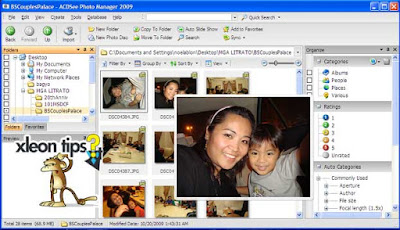

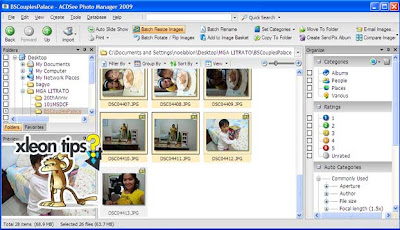
3. Select the files you wish to resize by highlighting them.
4. On the buttons, just above the images you will see some buttons available there. Choose Batch Resize Images.

5. A small dialogue box will appear, choose the percentage you think is enough. Best if you test this with one file first.
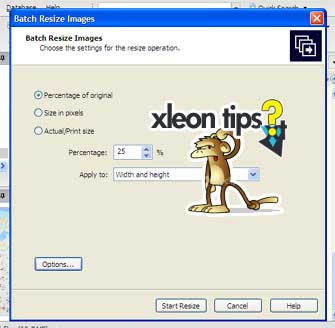

6. Now, you might want to choose the directory of the files to be resized. To do that click the options button as illustrated on the image above.
7. Another dialogue box will appear which will enable you to do your desired option.
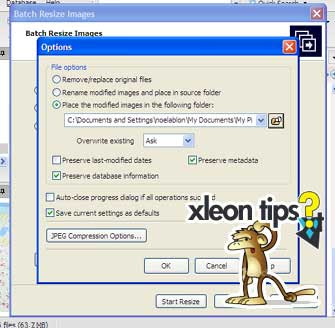

8. Click OK and then Click Start Resize. Now be patiend and just wait for it to finish.
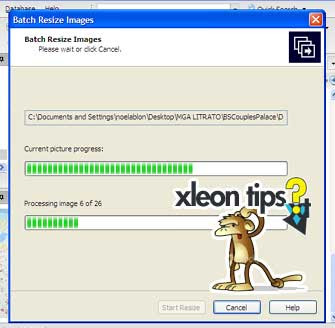

9. After the resize method, upload your photos at Facebook or Friendster.
10. Now, brag your newly uploaded photos to your friends. Thanks for using our tips.