Showing posts with label free software. Show all posts

Tuesday, January 24, 2023

A Free Studio Package for Vloggers with 3 Cool Effects

If you are video blogger or a vlogger, then this tool will help you with your vlogging. This tool is called Eye Contact. According to the developers from NVidia:

The new Eye Contact effect moves the eyes of the speaker to simulate eye contact with the camera — achieved by estimating and aligning gaze. The eyes retain their natural color and blinks, and there’s even a disconnect feature in case you look too far away, to transition smoothly between simulated and real eyes.

This tool or effects I believe is integrated in NVidia Broadcast app. I believe this app and this tool or effects is very useful to all bloggers like me who likes to make notes or quote some research or other people's quotes. I think this is also great for online news broadcasters who most of the time reads script they have written. This will help them maintain eye contact to viewers. I think this app is available FREE for NVidia users or GeForce RTX GPU owners.


They have also included the Vignette effect which adds bokeh effect on your video and at the same time they have updated their Virtual Background effect making it like a studio package for bloggers. So that's Eye Contact, Vignette and Virtual Background. You can download the app here. Enjoy the freebies guys.

Reference: Nvidia website

Monday, November 7, 2011

Foxit Acrobat Reader a Great Alternative

Are you tired of using the usual Adobe Acrobat Reader? or just don't like how their installer keeps tracking Adobe products. Well here is a great alternative and pretty much lighter too. It is a from Foxit Software company. They also have some other products and software that is quite useful for developers too. I'll probably take a look at their products if every I need one for products that we develop.

It is also for FREE so no worries about the cost. They also have readers for different kinds of handsets of different kinds of operating system like Windows Mobile, Android and for Symbian OS (mostly Nokia cellphones.)


I have tried it and it actually loaded my PDF file quite easily than Adobe's own reader. Go to their site and download a copy now. http://www.foxitsoftware.com/downloads/

Saturday, February 26, 2011

Blogger Update, Android App and New Search!

Have you noticed some problems regarding the template designer? A lot of people are having problems with their blogger accounts most specially when editing their templates. Yes it was reported and made known to Google already. Here is a report about it from their blog - Known Issues for Blogger. So to everyone, do not be afraid and just be patient. 

I too have experienced this for the past two days. I am trying to edit the template of my other blog - "My Omnia 2" when after the edits I've done - I was unable to save it. Read more and I'll tell you how to edit it even if you can't save your edits -that is if you still can't edit your templates.

Saturday, December 12, 2009

Free Image Organizer

Here is another freebie for you. Did you know that there is an image organizer that is FREE and very easy to use. If you have a Blogger account, do you know where your uploaded photos are hosted?

Here is the features of Picasa:

Picasa 3.6 has improved name tags, a feature based on the same technology that powers name tags on Picasa Web Albums. With name tags, you can organize your photos based on what matters most: the people in them. In this new version, you can also upload photos to your friends' collaborative albums, more easily geotag photos using Google Maps, and import photos from your camera and upload them to Picasa Web Albums in one step. Get started by downloading Picasa for PC or Mac at http://picasa.google.com

People albums Add name tags -- Picasa scans all the photos in your collection, identifies the ones with faces, and groups photos with similar faces together. It's easy to add name tags to dozens of photos at once by clicking "Add a name" below a photo and typing the person's name. Once you've tagged some pictures, you can make a face collage with one click, easily find all your pictures with the same two people in them, or upload your name tags to Picasa Web Albums. Learn more
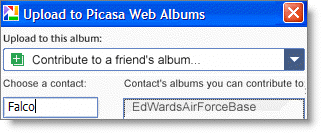
sync Collaborative albums -- Upload from Picasa -- In August 2009, we introduced collaborative albums in Picasa Web Albums. Now you can upload to a friend's album directly from the Picasa software. Learn more
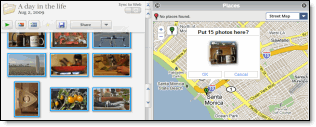
Maps geotag Geotag your photos with Google Maps -- Quickly add geotags using the newly integrated Google Maps. Click the Places button and drag your photos to the location where you took them. Of course, you can still use Google Earth to tag or view photos if you prefer. Learn more
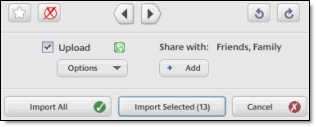
Import, upload, share Import, upload, and share, all at once -- We've improved the import process so that you can star your favorites, upload to Picasa Web Albums, and share with Google contact groups at the same time. Learn more
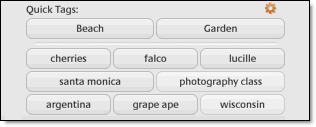
sync Tags -- Better bulk tagging, quick tags & tag counts -- We've improved the tagging experience. Just click the new Tags button on the right side of the Photo tray to add Quick tags , see tag counts for groups of images, and manage tags more easily. Learn more

Oh yes, your images are hosted in their Picasa website for free and you don't even know it, well some don't. You can download the desktop applications where you can easily share your images.

Thursday, December 10, 2009

Fast and Free Video Player

Lots of video clips can be downloaded easily nowadays and some are even at high quality. Have you watched a huge resolution video in full screen? I remembered I downloaded a high-resolution video a week ago and my problem is I can't watch the movie properly because of it's resolution is so high. My machine is not a high-end PC so it is a problem for me to watch high-quality videos specially with resolution of 720p.

A great thing happened yesterday. I was browsing the web and saw this player and so I tried since it plays MKV music videos that I have downloaded before from AZURES torrent downloader. I installed it and to my amazement it worked great. The video and audio were in perfect synch. So okay I tried some of my downloaded MKV videos with subtitles and once again I was really amazed, I remembered watching that video and missing a lot of subtitles but when I used VLC Media player, I never missed a subtitle and seen the whole movie with its full glory.

You can download it here directly - CLICK HERE! Remember to check with antivirus after you download. I have tested this version though and with my up-to-date anti-virus from Microsoft, Security Essential no virus was found. If you doubt Microsoft better check it with your favorite antivirus program.

File is 17MB in size.
Here is the link once again - VLC Movie Player.
Please comment if the link isn't working or if it has virus or if the program isn't working at all. I am not the developer of this software.

Saturday, December 5, 2009

SmillaEnlarger: Image Resizer for FREE!

Here is a useful application for everyone that can make almost any small images into something printable. This will be very useful specially when working with those free icons found on the internet. Sometimes we feel that the detail isn't enough that we like to add some cool details on the images we found.

I remembered working with images that was given to me before. If only I had this tool that time. I have to get my hands on a very expensive Adobe Photoshop or a pirated one just to make those images larger and printable.

No need to worry now. This application will give you the result you wanted for FREE!

Grab a copy and enjoy enlarging those small images you have and make it printable. Here are the requirements to run this application.

Operating Systems: Windows XP, Windows 2000, Windows Vista
Requirements: 20MB hard drive space; DirectX 9.0c or later; latest version of Flash
File Size: 8181 KB
Author: Mischa Lusteck

DOWNLOAD IT HERE!

Tuesday, November 24, 2009

Twittering on Your Desktop

Are you following on a twit or always in a hurry to twit? You don't need to go to your favorites URL, you can always show it on your desktop. Just login and post your new twit or read your friends' twits. You can even add short URL's to your post.

Twitteroo is the answer to that. Download version 1.5. Don't worry, I am going to post an update post once there is an update. I am also using this tool, it is very helpful.

OR go to there homepage below.

Here are the Twitteroo Features:

Twitteroo 1.5 is now available for download! But wait, that’s not all — the TwitterooCore API 1.4 is also available. The Twitter.com API changed slightly so we have updated the TwitterooCore to reflect those changes.

New Features

  • Double-click on any user’s status message and Twitteroo will automatically address a reply to that status
  • Usernames are shown in the status list to match Twitter.com (the full name is shown when a user’s status message is selected)
  • User icons are now cached so that you can Tweet even faster than before
  • Pressing the Enter key (or Ctrl+Enter) will send your status update to Twitter.com

Bug Fixes

  • The status box will not let you add line breaks (returns) into your status message
By the way, it is FREE!

Sunday, November 22, 2009

Tidy-up Your Bookmarks!


OrdinarySoft has just made a really great way of tidying-up all your bookmarks.

Tidy Favorites was developed to simplify the generation and management of PC browser bookmarks. Its intuitive Graphic User Interface (GUI) has been designed to minimize the management task and maximize the PC users experience with Internet navigation to web sites that are often visited. Tidy Favorites is simply a browser bookmark management tool that is so easy to use bookmarks may be added or deleted with such ease the user can spend more time enjoying the educational and entertainment values of the Internet versus spending time managing the bookmarks themselves. Whether the bookmark quantity is small or extremely large the degree of "bookmark management" only varies slightly.
Check out the video and be amazed. They have a Free version and also have the PRO version. A must try program for all surfers who like to bookmark websites according to their different interests.

Cllick HERE to go to the website.

Thursday, November 19, 2009

Want More Free Stuffs?

Tired of Microsoft Windows or Microsoft Office?

There is always a free way for you to have a new Operating System and Office Suite. You don't need to worry about licenses anymore.

For Operating system, try UBUNTU. It's like windows but FREE! Go HERE to download the free operating system.

For Office Suite, try OPENOFFICE. It's like Microsoft Office's complete package (Word, Excel, etc..). Download your copy HERE.

Now if you are a graphics artist that uses Adobe Photoshop, you can also try GIMP software. It's basically like Adobe Photoshop only for free. If you have installed Ubuntu already, just run apt-get install gimp to get the ltest version of Gimp software.

AND DID YOU KNOW?

Did you know that having a copy of Ubuntu Installer at home can come in handy? If you have been infected by a virus or having a bad day with your windows crashing and there is no way for your windows to start-up at all, Ubuntu will save your day.

Ubuntu Installer gives you a chance to try the OS before you even install it. Try running Ubuntu and retrieve all your important files before you format or install your new OS.

Enjoy your freebies people.